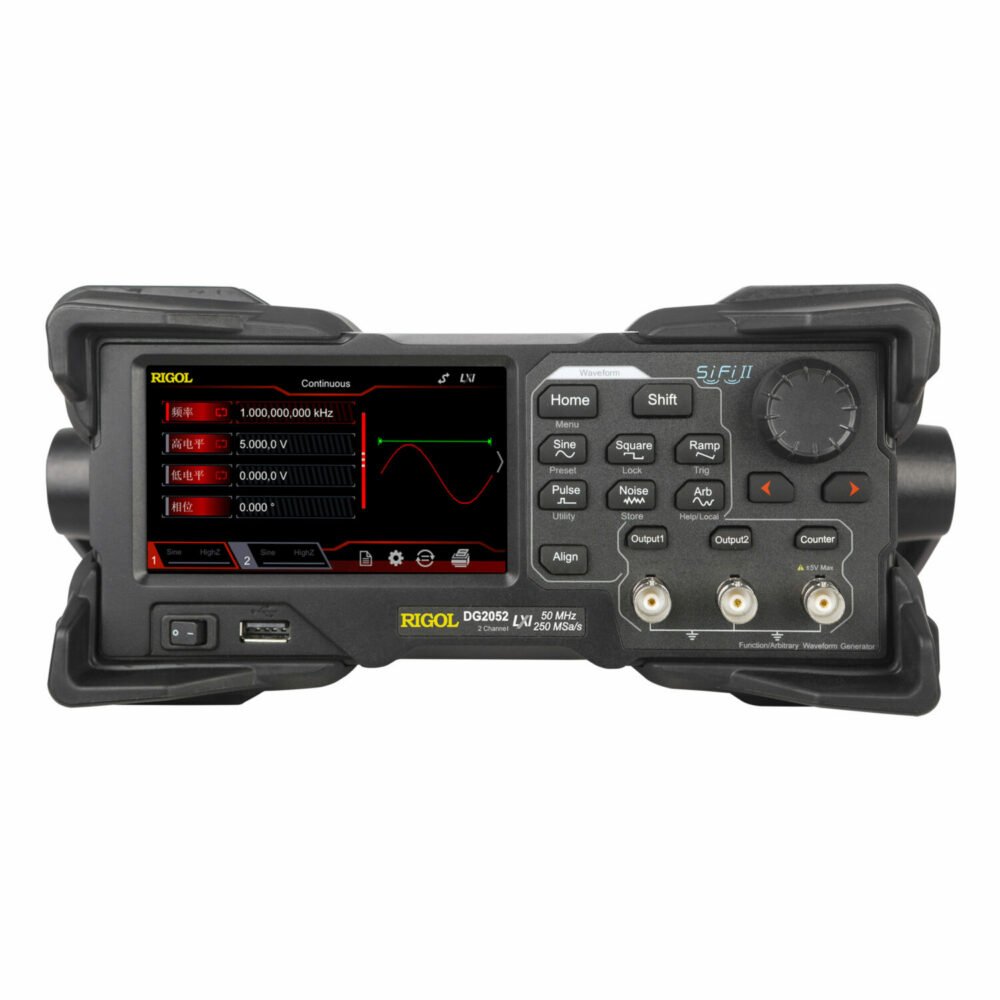
Stepping into the world of electronics design, testing, or troubleshooting? Then you've likely encountered the need for a reliable signal source. While a simple DC power supply handles steady voltage, real-world circuits thrive on dynamic, changing signals. That’s precisely where a waveform generator becomes indispensable. Whether you're debugging a tricky analog filter, validating a sensor interface, or simulating communication protocols, choosing and buying waveform generators isn't just about picking a box; it's about investing in a foundational tool that empowers your creativity and problem-solving.
This guide is for anyone looking to navigate the often-complex landscape of signal generation. We'll demystify the jargon, compare the options, and provide a clear roadmap to help you select the perfect waveform generator for your specific needs – without overspending or under-equipping.
At a Glance: Your Waveform Generator Shopping Cheat Sheet
- What it does: Produces varied electrical signals (sine, square, custom) to test circuits.
- Why you need one: Essential for designing, testing, and troubleshooting electronic circuits by simulating real-world conditions.
- Main types: Function Generators (basic, standard waves), Arbitrary Waveform Generators (AWG – custom waves, high precision), Pulse Generators (digital pulses), RF Signal Generators (high frequency, complex modulation).
- Key specs to watch: Frequency range, sampling rate, vertical resolution (bit depth), output amplitude, and modulation capabilities.
- Budgeting: Expect to pay $100 for basic hobbyist units, $300-$800 for solid mid-range AWGs, and $800+ for professional-grade instruments.
- Golden Rule: Match the generator's capabilities to your actual project needs, not just perceived future wants.
The Heartbeat of Your Electronics Lab: Understanding Waveform Generators
At its core, a waveform generator is an electronic test instrument designed to create and output repeating or non-repeating electrical signals. Think of it as the "signal factory" for your circuits. These signals come in a wide range of shapes, frequencies, and amplitudes, serving as the crucial input that allows you to observe, measure, and validate your circuit's response. From the smooth, predictable flow of a sine wave to the sharp transitions of a pulse, these instruments bring your designs to life.
For anyone working with electronics, a waveform generator provides the means to simulate real-world conditions, acting as a critical partner to tools like visualizing signals with an oscilloscope or basic electrical measurements with a multimeter.
Why These Signals Matter: Key Applications
The versatility of waveform generators makes them indispensable across numerous fields:
- Educational Labs: For students, they're the window into visualizing AC circuit behavior, demonstrating concepts like impedance, resonance, and filtering.
- Research & Development: Engineers use them to validate sensor interfaces, test communication protocols, and design robust control systems, ensuring new products meet specifications.
- Manufacturing & Production: In automated test environments, waveform generators serve as reliable stimulus sources, rapidly checking the functionality of components and finished devices.
- Analog & Mixed-Signal Development: For complex circuit designs that blend analog and digital elements, they are absolutely critical for precise design verification and troubleshooting.
- Emerging Tech: With the rise of embedded systems, IoT devices, and DIY electronics, there's a growing demand for instruments that can generate the complex, customized signals these technologies require. Advances in Digital-to-Analog Converter (DAC) technology have made these tools more accessible and capable than ever.
Demystifying the Types: Which Generator Is Right for You?
Not all waveform generators are created equal. Their design and capabilities are specialized for different tasks. Understanding the distinctions is the first critical step in choosing your perfect match.
Function Generators: The Workhorse of Standard Waveforms
Think of a function generator as the foundational tool for signal creation.
- Description: These units excel at producing standard, periodic waveforms: sine, square, and triangle waves are their bread and butter. Many also offer sawtooth and pulse outputs.
- Pros: They are typically the most inexpensive and easiest to operate, making them ideal for beginners, hobbyists, and educational settings. For basic AC testing, validating filters, or simple clock signals, they're often sufficient.
- Cons: Their main limitation is flexibility. You're generally confined to the built-in waveforms, with limited options for customization. Frequency precision can be lower than advanced models, and they rarely support arbitrary, user-defined signals.
Arbitrary Waveform Generators (AWG): Unleash Your Creativity
When standard waveforms just won't cut it, an AWG steps in to offer unparalleled control.
- Description: AWGs allow you to define and generate virtually any waveform shape imaginable. You create the waveform using software, upload the data points to the generator's memory, and it outputs the signal. They feature higher sampling rates and better vertical resolution than basic function generators.
- Pros: Full waveform customization opens up possibilities for simulating complex sensor outputs, medical signals (like ECGs), corrupted communication signals, or unique test sequences. They offer high signal fidelity, advanced modulation capabilities (AM, FM, PM), and the ability to sequence multiple waveforms.
- Cons: Generally more expensive than function generators, AWGs also come with a steeper learning curve due to their advanced features and reliance on PC software for waveform creation.
Pulse Generators: Precision for Digital Systems
For engineers deeply entrenched in digital logic and timing, pulse generators are specialized tools.
- Description: These generators focus specifically on creating highly precise pulses. They're designed to produce TTL (Transistor-Transistor Logic) or CMOS-compatible signals with extreme accuracy over pulse width, delay, and repetition rate.
- Pros: They offer excellent control over the critical edges of digital signals, boasting very low jitter (timing instability) and incredibly fast rise and fall times. This is crucial for testing high-speed digital circuits and ensuring understanding signal integrity in complex systems.
- Cons: Their utility is limited to pulse-type signals, making them unsuitable for generating the smooth, continuous waveforms needed for analog simulations.
RF Signal Generators: The Masters of High Frequency
While often a separate category, many RF signal generators include baseband waveform capabilities for modulation.
- Description: These are highly specialized instruments designed to produce very high-frequency signals, often in the Gigahertz (GHz) range, with exceptional spectral purity. When they include waveform capability, it's typically for modulating a high-frequency carrier with a baseband signal.
- Pros: Essential for wireless communications testing, radar development, and other high-frequency applications where spectral purity and stable, high-frequency output are paramount.
- Cons: They are significantly more expensive and complex to operate than general-purpose waveform generators. For most audio, analog, or even high-speed digital applications, an RF signal generator is usually overkill.
Decoding the Specs: Critical Parameters for Your Decision
Once you have a handle on the types, the next step is diving into the technical specifications. These parameters dictate a generator's capabilities and, ultimately, whether it can meet your specific testing demands.
Frequency Range: How Fast Can it Go?
This is arguably the most fundamental specification, defining the highest and lowest signal frequencies the generator can produce.
- The Sweet Spot: For general electronics, audio work, and many embedded systems, a frequency range up to 20 MHz is often perfectly adequate.
- High-Speed Needs: If you're working with high-speed digital interfaces, modern microcontrollers, or RF applications, you might need 100 MHz or more.
- Low Frequencies: Don't overlook the lower limit! Many generators can go below 1 Hz, sometimes down to 0.1 or 0.2 Hz, which is vital for testing very slow control loops or long-period phenomena.
Sampling Rate (AWGs Only): The Digital to Analog Bridge
Measured in Samples per second (Sa/s), the sampling rate determines how accurately a digital waveform is converted into an analog signal.
- Nyquist Criterion: A good rule of thumb is that the sampling rate should be at least 4-5 times the maximum frequency of the waveform you want to generate. While Nyquist states 2x, more samples ensure smoother, more accurate reproduction.
- Real-world Example: A 200 MSa/s (Mega Samples per second) sampling rate allows for clean, accurate reproduction of signals up to about 40 MHz. Higher sampling rates mean more fidelity for complex or fast-changing arbitrary waveforms.
Vertical Resolution (Bit Depth): Smoothness and Precision
This specification refers to the number of bits in the Digital-to-Analog Converter (DAC) and directly impacts the waveform's fidelity and the generator's precision.
- What it means: A higher bit depth (e.g., 14-16 bits) means the output voltage can be divided into a greater number of discrete steps.
- The Benefit: More steps result in smoother waveforms with less quantization noise. This is absolutely critical for precision simulations where even small inaccuracies can skew test results.
- The Math: The smallest discrete voltage step is calculated as Peak-to-peak voltage / 2^N, where N is the resolution in bits. More bits = smaller steps = finer control.
Output Amplitude & Offset Range: Hitting the Right Voltage Levels
You need a generator that can output the correct voltage levels for your circuit.
- Amplitude: Check if the peak-to-peak voltage (e.g., ±5 V or 10Vpp) matches your circuit's requirements.
- DC Offset: This feature allows you to shift the entire waveform's baseline up or down. For instance, you might need a 3.3V digital signal that swings between 0V and 3.3V, requiring a DC offset of 1.65V with a 3.3Vpp amplitude.
Modulation Capabilities: Communicating with Complexity
If your work involves communication systems, sensor simulations, or specific signal processing, modulation support is key.
- Common Modulations: Look for AM (Amplitude Modulation), FM (Frequency Modulation), PM (Phase Modulation), FSK (Frequency Shift Keying), and PWM (Pulse Width Modulation). These allow you to embed information or vary signal characteristics in ways that mimic real-world phenomena.
Memory Depth (AWGs Only): Long Stories or Short Loops?
For arbitrary waveform generators, memory depth refers to the number of data points (samples) the instrument can store for a custom waveform.
- What it affects: Larger memory enables longer, more detailed, or more complex arbitrary sequences without repetitive looping artifacts.
- Practical Needs: Simple arbitrary patterns might only require 16 kpts (kilo points). However, extended simulations, such as emulating radar pulses or long communication bursts, could demand 1 Mpts (Mega points) or more.
Connectivity: Bridging Your Bench to Your PC
Modern test equipment often integrates with computers for automation and advanced control.
- Common Interfaces: Look for USB, LAN (Ethernet), GPIB, or even Wi-Fi.
- Automation: Support for SCPI (Standard Commands for Programmable Instruments) is a strong indicator of good software integration, allowing you to write scripts and automate your tests. This is a must-have for automated foundational test equipment setups.
Channels: Double the Signals, Double the Fun?
Some waveform generators offer dual channels.
- Benefits: Dual-channel models are incredibly useful for tasks like differential signaling, I/Q (in-phase/quadrature) generation for RF, or synchronized multi-signal injection. They allow you to compare phase shifts, drive two different inputs, or create complex signals that require multiple, synchronized components.
Waveform Quality Metrics: Clean Signals are Happy Signals
Beyond the basic parameters, the quality of the output signal is paramount.
- Sine Wave Distortion (THD): A good quality sine wave should have Total Harmonic Distortion (THD) less than 2%. Many professional units offer significantly lower, often less than 0.1%. Higher distortion can introduce unwanted harmonics into your test circuit.
- Triangular Wave Linearity: For triangular waves, linearity should be better than 99% between 10% and 90% of the waveform’s amplitude, ensuring a consistent slope.
- Rise and Fall Times (Square Wave): Critical for digital systems, these specify how quickly a square wave transitions from low to high (rise) and high to low (fall). Faster times (e.g., around 100 nanoseconds between 10% and 90% of the waveform) are essential for high-speed digital logic.
- Symmetry: Many generators allow adjustable symmetry (e.g., 20% to 80%) for certain waveforms like pulses or sawtooths.
- Output Levels: The maximum output levels are typically 10 or 12 volts peak-to-peak. Ensure it can drive your specific circuit.
- Output Impedance: Most waveform generators have a 50Ω output impedance. This is important for impedance matching with cables and loads to prevent signal reflections and power loss.
- Frequency Stability: Digital waveform generators, which use a crystal for their clock, are far more stable than older analog units. Expect stability around 500 parts per million (ppm) for digital vs. ~0.1% per hour for analog.
- Phase Lock Capability: The ability to lock the output signal's phase to an external clock source is vital for synchronized measurements or integrating with other test instruments.
- Bandwidth: Defines the frequency at which the output signal attenuates by -3 dB relative to its DC or low-frequency amplitude.
Advantages & Limitations: A Balanced Perspective
Like any tool, waveform generators come with their own set of strengths and weaknesses.
The Upsides
- Versatile Signal Creation: Produce almost any electrical signal for diverse testing scenarios.
- Precise Control: Unmatched accuracy over signal characteristics like frequency, phase, shape, and amplitude.
- Broad Utility: Supports everything from basic classroom experiments to advanced professional-grade development.
- Automated Testing: Enables repeatable, automated testing workflows, saving time and ensuring consistency.
The Downsides
- Cost: Higher-end models, especially AWGs from premium brands, can be a significant investment (often >$2,000).
- Learning Curve: Requires some understanding of signal theory, impedance matching, and software operation for advanced features.
- Quality Variations: Budget units may exhibit harmonic distortion, clock instability, or lower resolution, which can impact measurement accuracy.
- Overkill for Simple Tasks: If all you need is a steady DC voltage or simple continuity checks, a waveform generator is an expensive and unnecessary tool.
Ideal Use Cases for Your Investment
A waveform generator truly shines when you're:
- Regularly debugging analog circuits, like filter networks or audio amplifiers.
- Developing firmware for sensor interfaces that require specific input patterns.
- Teaching electronics concepts and demonstrating AC circuit behavior.
- Testing the frequency response of circuits or components.
- Simulating real-world inputs (e.g., sensor data, communication signals) during prototyping.
Your Strategic Roadmap: A Step-by-Step Selection Guide
Now that you're armed with knowledge, let's walk through a structured approach to picking the right waveform generator.
Step 1: Define Your Core Use Case(s)
Before looking at a single spec, clearly articulate why you need this tool.
- Are you a hobbyist? Basic function generator for simple AC tests.
- An educator? Robust function generator or entry-level AWG for classroom demos.
- An R&D engineer? High-performance AWG with advanced modulation and memory.
- Working with digital logic? A pulse generator might be more appropriate.
- Testing communication systems? An RF signal generator with modulation may be required.
Match the features to your actual needs, not just a desire for the most powerful unit available.
Step 2: Determine Your Required Frequency Range
This is often the primary filter. List the highest frequency signal you anticipate needing, then add a 20% margin for future-proofing. If you're working in audio, 20 kHz is your upper limit; for high-speed USB, you're in the MHz range.
Step 3: Function Generator vs. Arbitrary Waveform Generator (AWG)?
This is the biggest fork in the road.
- Go Function Generator if: You primarily need standard waveforms (sine, square, triangle) and your budget is tight.
- Opt for an AWG if: You require custom, user-defined waveforms, need high signal fidelity, advanced modulation, or complex sequencing (e.g., simulating an ECG, generating complex radar pulses). This choice will significantly impact cost and complexity.
Step 4: Verify Output Requirements
Consider the voltage levels and load characteristics of your target circuit.
- Amplitude: Does the generator's peak-to-peak voltage range match your circuit's inputs (e.g., 0-5V logic, ±12V audio)?
- DC Offset: Will you need to shift the baseline of your signals?
- Load Impedance: Most circuits expect a 50 Ω source impedance. Ensure the generator can drive your load without significant signal degradation.
Step 5: Evaluate Connectivity and Automation Needs
If you plan to automate tests, log data, or integrate the generator into a larger test system, connectivity is crucial.
- Automated Testing: USB or Ethernet with SCPI command support is essential.
- Software: Check if the manufacturer provides free PC software for waveform editing, control, and data logging.
Step 6: Assess Build Quality and Ergonomics
Don't underestimate the physical aspects.
- Enclosure: Metal enclosures generally offer better heat dissipation and EMI shielding than plastic housings.
- Controls: Are the front panel controls intuitive? Is the display clear?
- Bench Space: Consider the footprint of the unit on your workbench.
Step 7: Review Software Compatibility and Support
Good software can make a huge difference in usability.
- PC Apps: Check for free, user-friendly PC applications for waveform creation, editing, and instrument control.
- Documentation: Is there robust online documentation, user manuals, and application notes available? This is vital for effectively learning and troubleshooting.
Step 8: Understand Return Policies and Warranty
Especially when buying online, confirm the return window and warranty period. Does it include a calibration certificate, which is often crucial for professional labs?
Red Flags & Pitfalls: What to Watch Out For
Navigating the market for effectively debug circuits requires a discerning eye. Avoid these warning signs:
- Vague Specifications: Be wary of manufacturers who don't clearly state key specs like sampling rate, vertical resolution, or frequency range.
- Missing THD Figures: For sine waves, an unstated Total Harmonic Distortion (THD) can indicate poor signal quality.
- No Customer Support or Documentation: A lack of readily available manuals, software, or contact information can lead to frustration down the line.
- Unrealistic Claims: If a generator promises professional-grade features at a hobbyist price point, proceed with caution.
- Poor Online Reviews: Check independent reviews and user forums for consistent complaints about performance or reliability.
The Cost Factor: What to Expect at Different Price Tiers
Waveform generators span a broad price spectrum, reflecting their capabilities, precision, and brand reputation.
- $100–$300: Entry-Level Hobbyist/Student:
- What you get: Basic function generators, often single-channel, with limited frequency ranges (e.g., up to 5-10 MHz) and lower vertical resolution (8-10 bits). May lack arbitrary capabilities or advanced modulation.
- Best for: Hobbyists, students, and classrooms needing simple sine/square/triangle waves for basic experiments. Value is often found here for simple basic test equipment setups.
- $300–$800: Mid-Range Maker/Junior Engineer:
- What you get: Solid entry-level AWGs or more capable function generators. Expect decent resolution (12-14 bits), dual channels, and USB control. Frequency ranges typically extend to 20-30 MHz. Some modulation capabilities might be included.
- Best for: Serious makers, junior engineers, small businesses, and educational institutions requiring more flexibility and better signal quality without breaking the bank. This range often offers the best overall value.
- $800–$2,000: Professional-Grade Development:
- What you get: High-performance AWGs with impressive sampling rates (often >200 MSa/s), low jitter, deep memory, and comprehensive modulation suites. Multi-channel options are common, as is LAN/GPIB connectivity for automation.
- Best for: Design verification labs, R&D teams, and engineers working on complex analog or mixed-signal projects where signal fidelity and advanced features are crucial.
- $2,000+: Premium Benchtop Instruments:
- What you get: Top-tier AWGs from brands like Keysight, Tektronix, and Rohde & Schwarz. These units offer industry-leading performance: ultra-high sampling rates (GSa/s), deep memory, advanced triggering, and highly stable, spectrally pure outputs. They often come with calibration traceability.
- Best for: Research institutions, advanced communication systems development, aerospace, and any application where uncompromising performance and certified accuracy are required.
Best Value Tip: Many users find a well-rounded and capable tool in the $400–$600 range. Additionally, consider refurbished units from authorized dealers; they can offer certified performance and warranties at a significantly lower cost.
Smart Buying Practices: Where and How to Purchase
Once you've narrowed down your choices, consider these best practices for a smooth purchase.
Authorized Distributors vs. Direct
- Authorized Distributors: For new equipment, purchasing from reputable authorized distributors (e.g., Digi-Key, Mouser, Newark, Element14) or directly from manufacturers ensures you receive genuine products, full warranties, and access to technical support.
- Bulk & Educational Discounts: If you're buying multiple units for a lab or classroom, inquire about educational or volume discounts.
International Considerations
- Voltage and Plug Type: Always verify local voltage compatibility and plug types if sourcing internationally.
- Import Duties & Shipping Insurance: Be aware of potential import duties, taxes, and ensure shipping insurance is in place for high-value items.
Buying Used Equipment
- Insist on Reports: When considering used equipment, always insist on recent calibration reports and functional testing videos. This verifies the unit's performance and accuracy.
- Avoid Unknown Sellers: Be extremely cautious of third-party sellers with no return policy, vague product descriptions, or unclear provenance. A good deal isn't good if the unit doesn't work or provides inaccurate signals.
Long-Term Value: Maintenance and Safety Tips
A waveform generator is an investment. Proper care ensures its longevity and accuracy.
- Environment: Keep your unit in a dust-free environment with adequate ventilation to prevent overheating.
- Calibration: If supported, perform periodic self-calibration. For professional use or critical applications, annual formal calibration by a certified lab is recommended to ensure signal accuracy over time.
- Voltage Limits: Never exceed the maximum input/output voltage ratings. Over-voltage can permanently damage the internal circuitry.
- Connections: Always disconnect power to the generator and the circuit under test before connecting or disconnecting probes and BNC cables.
- Grounding: Use isolated power supplies when testing mains-connected circuits to prevent ground loops and potential hazards. Ensure proper grounding of your test setup.
- EMC Compliance: In commercial settings, ensure your equipment complies with relevant electromagnetic compatibility (EMC) regulations (e.g., FCC Part 15 in the U.S.) to prevent interference.
- Records: Retain original purchase receipts, warranty information, and any service records for future reference.
Frequently Asked Questions (FAQs)
What's the main difference between a function generator and an AWG?
A function generator produces standard, predefined waveforms like sine, square, and triangle waves. An Arbitrary Waveform Generator (AWG) allows users to create and output custom, user-defined waveforms by uploading data points, offering much greater precision and flexibility.
Can I use a waveform generator to test audio equipment?
Yes, absolutely. If the generator's frequency range covers the audio band (typically 20 Hz to 20 kHz) and its output amplitude matches the input sensitivity of your audio equipment, it's an excellent tool for testing. Many AWGs also support frequency sweeps for analyzing audio component frequency response.
Why would I need a waveform generator with two channels?
Dual-channel waveform generators are useful for various applications: generating differential signals, creating I/Q (in-phase/quadrature) modulation for RF, or comparing phase shifts between two signals in a circuit. For stimulating a single input, a single-channel unit is sufficient.
How important is waveform memory depth?
Memory depth dictates how long or complex a custom arbitrary signal can be without repeating. For simple, repetitive patterns, 16 kpts might be enough. However, for extended simulations or highly detailed, non-repeating custom signals (like those found in complex communication protocols), 1 Mpts or more becomes critical to avoid looping artifacts.
Is periodic calibration necessary for a waveform generator?
For hobbyist use, probably not. But for professional labs, critical design work, or any regulated environment, periodic calibration (often annually) is essential to ensure the instrument's output signals remain accurate and traceable to national standards.
Can a waveform generator simulate noise signals?
Many advanced waveform generators, especially AWGs, can simulate various types of noise signals, such as white noise or Gaussian noise. This is invaluable for testing the noise immunity and performance of communication systems, filters, and sensor interfaces.
How can a waveform generator help with frequency response testing?
By generating a signal that sweeps across a wide range of frequencies, you can apply it to a circuit and then use an oscilloscope or spectrum analyzer to measure how the circuit's output amplitude and phase change at each frequency. This allows you to characterize the circuit's frequency response and ensure it performs as expected.
Finding Your Signal, Confidently
Choosing and buying waveform generators might seem like a deep dive into technical specifications, but with a clear understanding of your needs and the capabilities on offer, it becomes a straightforward process. This isn't just about purchasing another piece of equipment; it's about acquiring a powerful tool that will unlock new possibilities in your design, testing, and troubleshooting endeavors. By focusing on essential parameters, recognizing quality indicators, and selecting a generator that truly fits your applications, you'll be well on your way to generating the perfect signal for any challenge. To delve deeper into the core concepts, you can always learn about waveform generators in detail. Happy generating!